One Software
Operating Status of Equipment
Remote Access
Operating Status of Equipment
Remote Access


Analysis Data System
LabSolutions CS is Shimadzu’s enterprise-level client-server laboratory data management platform, designed to centralize analytical data, streamline laboratory workflows, and support regulatory compliance across multiple instruments and users. As part of the LabSolutions ecosystem, LabSolutions CS enables laboratories to securely manage, process, and review analytical data while maintaining data integrity and operational efficiency.
Built for modern analytical laboratories, LabSolutions CS provides a centralized environment where data generated by chromatography, mass spectrometry, spectroscopy, and other analytical systems can be securely stored and accessed. Unlike standalone workstation solutions, the client-server architecture allows users to retrieve, review, monitor, and manage analytical information from authorized computers across the network, improving collaboration and data accessibility throughout the organization.
A key advantage of LabSolutions CS is its support for electronic records and electronic signatures (ER/ES). These capabilities help laboratories maintain compliance with regulatory requirements while ensuring traceability, security, and audit readiness. The platform records user activities, protects analytical data, and helps organizations maintain high standards of data integrity throughout the analytical workflow.
LabSolutions CS also enables centralized instrument management and workflow standardization. Users can monitor instrument status, manage analytical projects, review results, and generate reports from network-connected client computers. By consolidating laboratory information within a single environment, laboratories can reduce administrative burden, improve efficiency, and ensure consistent data management practices across multiple departments and locations.
The software integrates seamlessly with the broader Shimadzu informatics portfolio, including LabSolutions Insight, Peakintelligence™, LabSolutions MD, LabSolutions Sync, and other workflow management solutions. This connected ecosystem supports automated reporting, AI-assisted peak integration, method development, remote data management, and analytical workflow optimization, helping laboratories accelerate decision-making and improve productivity.
Whether used in pharmaceutical quality control, environmental testing, food safety laboratories, petrochemical facilities, or research organizations, LabSolutions CS provides a scalable foundation for secure data management and regulatory compliance. By combining centralized data storage, robust security, network-based collaboration, and seamless integration with analytical instruments, LabSolutions CS helps laboratories transform analytical data into trusted business and scientific insights.
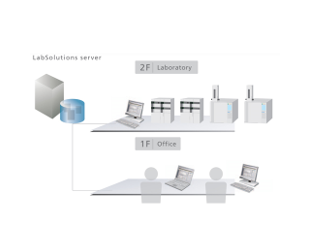
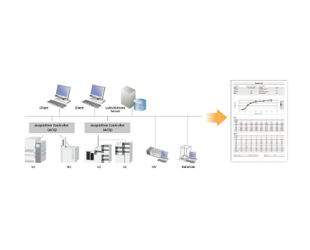
Since all analytical data is managed in the database of a server computer, LabSolutions CS can read data from any personal computer on a network. In addition, analysis directions and instrument monitoring and control can be performed from a personal computer (client PC) not connected to the instruments.
Moreover, client PC functions are performed on a server and client PCs corresponding to a Windows terminal service do not need to install LabSolutions software.
Furthermore, LabSolutions CS is compatible with Citrix Virtual Apps and can perform more advanced server management.
Recommended for the following customers
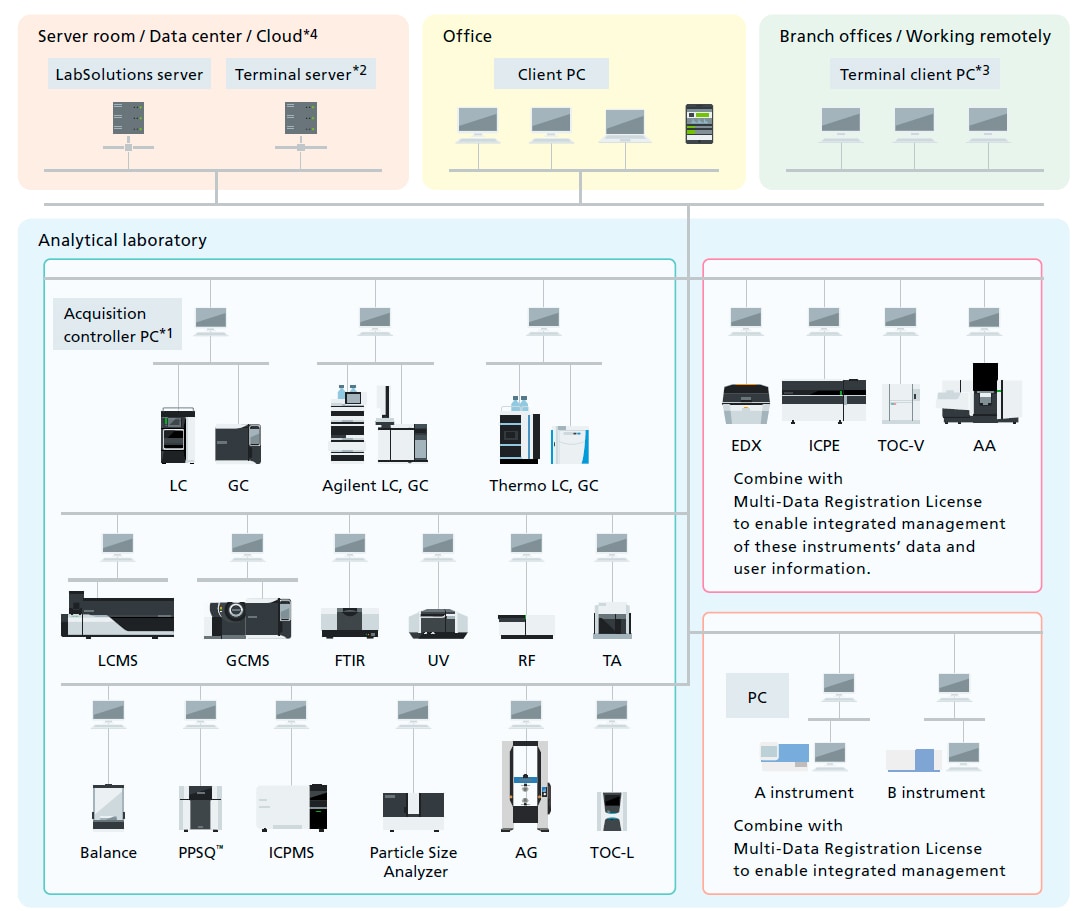
*1 The acquisition control PC controls analytical instruments. It can also be used to send analytical instructions and perform postrun analysis, just like a client PC.
*2 If a terminal service is used, then LabSolutions software does not need to be installed on client PCs.
*3 If an iPad is used, then Virtual Apps from Citrix must be installed.
*4 It works on Amazon Cloud(Amazon EC2). Please contact Shimadzu representatives for more information.
LabSolutions i-Qlinks
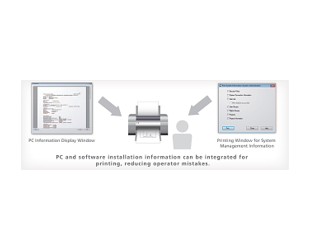
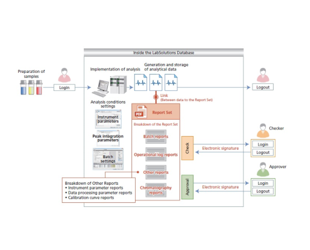
LabSolutions i-QLinks can be seamlessly connected to LabSolutions, which enables analysis equipment control and analysis results management, and by eliminating paper operations, all the various information needed for a lab can be centrally managed in a database. In addition, LabSolutions i-QLinks provides support functions and Web-enabled support for each step of the workflow, providing three solutions to the challenges of traditional labs: "human error" "operation and management of multiple systems," and "Regid location-based work.
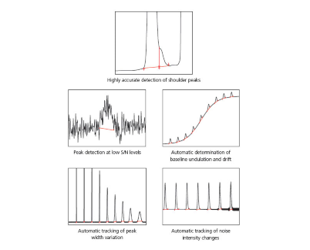
Peak Integration Algorithm i-Peakfinder
Shimadzu LabSolutions CS
How a Unified Laboratory Management System Streamlines Your Analysis
Shimadzu’s LabSolutions software platform provides a single, easy-to-use interface for multiple types of instruments, including HPLC, LC-MS, AA, GC, FTIR, and UV-Vis. This enables more efficient laboratory workflows, simplified management, and reduced costs. In addition, LabSolutions offers complete data management to ensure data integrity and secure information.